
| 일 | 월 | 화 | 수 | 목 | 금 | 토 |
|---|---|---|---|---|---|---|
| 1 | 2 | 3 | 4 | |||
| 5 | 6 | 7 | 8 | 9 | 10 | 11 |
| 12 | 13 | 14 | 15 | 16 | 17 | 18 |
| 19 | 20 | 21 | 22 | 23 | 24 | 25 |
| 26 | 27 | 28 | 29 | 30 |
- 원격서버지원
- kubernetes
- nodeport
- 인그래스컨트롤러
- 쿠버네티스 구조
- 쿠버네티스 인그래스 컨트롤러 구성 예시
- 도커프라이빗레지스트리
- timesynchronization
- apply
- createvsapply
- clustermanagement
- 여러 레지스트리를 하나의 시크릿으로 묶고
- servicemesh
- ingresscontroller
- 이미지풀시크릿생성
- 노드포트
- 포트추적
- ingress
- 쿠버네티스
- 인증서설치후 런타임 재시작
- 프라이빗레지스트리
- networktimeprotocol
- chrony
- 컨테이너런타임 재시작
- ingressrules
- ingressservice
- k8s
- 인그래스
- kubectl
- servertimesync
- Today
- Total
madebychung
SSH 키 가져오기 /ubuntu 본문
secureCRT SSH 로그인하기
1. 우분투에 ssh 설치
root@admin1-virtual-machine:/# apt update
root@admin1-virtual-machine:/# apt install openssh-server
root@admin1-virtual-machine:/# apt list openssh*
root@admin1-virtual-machine:/# systemctl status sshd
root@admin1-virtual-machine:/# sudo ufw allow ssh
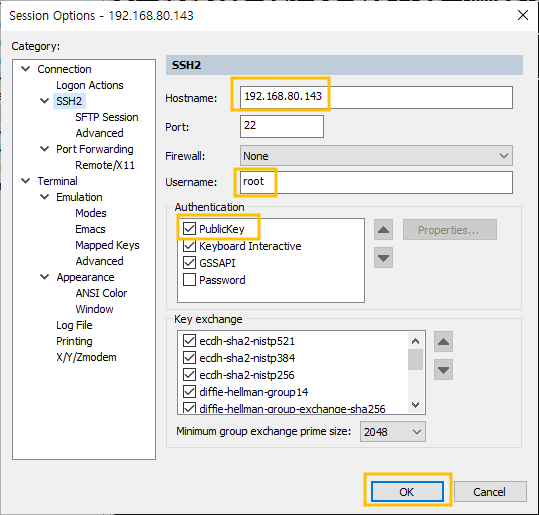
개인키가 있는곳에서 복사하려고 했는데
[root@centos7 ~]# cd .ssh
[root@centos7 .ssh]# ls
authorized_keys id_rsa id_rsa.pub known_hosts
[root@centos7 .ssh]# ssh-copy-id -i id_rsa.pub 192.168.80.143 <- 가져갈 pc의 ip
root@192.168.80.143's password:
Permission denied, please try again. <- 퍼미션 디나이가 뜨고

The server has disconnected with an error. Server message reads:
A protocol error occurred. Change of username or service not allowed: (root,ssh-connection) -> (admin1,ssh-connection)
이렇게 오류가 떴다
권한 문제
우분투에 들어가서
root@admin1-virtual-machine:/# vi /etc/ssh/sshd_config
주석 제거 및 PermissionRootLogin yes 로 변경해준다

root@admin1-virtual-machine:/# systemctl restart sshd
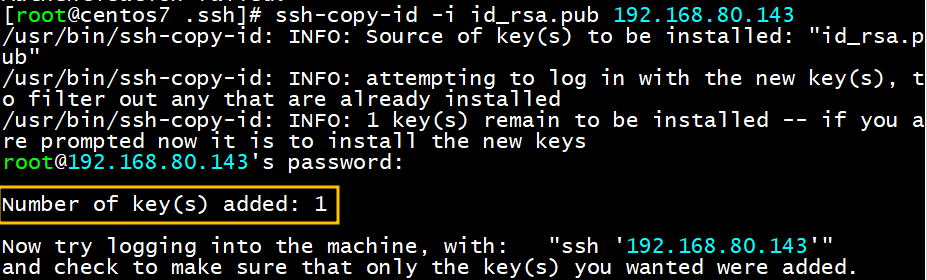
키가 잘 복사 되었고
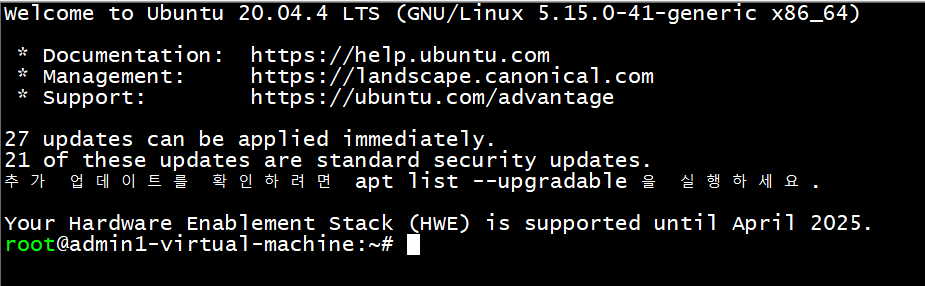
secureCRT 에서 잘 로그인이 된다
'system' 카테고리의 다른 글
| [centos7]특정버전 tomcat 설치하기 (0) | 2023.02.14 |
|---|---|
| [centOS7] 특정버전 mysql 설치 및 다운로드 아카이브 (0) | 2023.02.14 |
| [window] ssh 접속오류 (0) | 2023.02.06 |
| [Linux/rocky]ssh 포트번호 변경 (0) | 2023.02.06 |

