
Notice
Recent Posts
Recent Comments
Link
| 일 | 월 | 화 | 수 | 목 | 금 | 토 |
|---|---|---|---|---|---|---|
| 1 | 2 | 3 | 4 | |||
| 5 | 6 | 7 | 8 | 9 | 10 | 11 |
| 12 | 13 | 14 | 15 | 16 | 17 | 18 |
| 19 | 20 | 21 | 22 | 23 | 24 | 25 |
| 26 | 27 | 28 | 29 | 30 |
Tags
- ingress
- ingresscontroller
- kubectl
- apply
- 인증서설치후 런타임 재시작
- 프라이빗레지스트리
- 인그래스컨트롤러
- createvsapply
- clustermanagement
- 여러 레지스트리를 하나의 시크릿으로 묶고
- ingressrules
- 노드포트
- k8s
- 이미지풀시크릿생성
- 쿠버네티스 구조
- ingressservice
- nodeport
- 쿠버네티스
- timesynchronization
- servicemesh
- 도커프라이빗레지스트리
- chrony
- 컨테이너런타임 재시작
- servertimesync
- 인그래스
- kubernetes
- networktimeprotocol
- 쿠버네티스 인그래스 컨트롤러 구성 예시
- 포트추적
- 원격서버지원
Archives
- Today
- Total
madebychung
쿠버네티스 인그래스 컨트롤러 구성 예시 본문
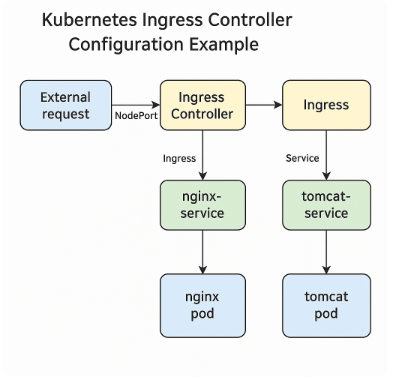
Kubernetes Ingress Controller 실사용 사례 완전 정리 (초보자용)
이번 글에서는 실제 온프레미스 환경에서 구성한 Ingress Controller 기반 서비스 흐름을 예시로 설명합니다. 다음 항목을 포함해 단계별로 확인 가능한 명령어와 함께 정리했으며, 초보자도 쉽게 이해할 수 있도록 흐름도도 제공합니다.
✅ 흐름도 개요
전체 서비스 흐름:
외부 요청 → NodePort(30080/30443) → Ingress Controller → Ingress 규칙 → Service → Pod

※ 위 이미지: 실제 요청 흐름을 보여주는 다이어그램입니다.
색상 구분으로 각 구성요소(Nodes, Ingress Controller, Service, Pod)를 명확히 나타냅니다.
1. 리소스 생성 여부 확인
kubectl get all -n dev-systemDeployment, Service, ConfigMap, Job, IngressClass 등이 정상 생성되었는지 확인합니다.
2. Ingress Controller 상태 확인
kubectl get pods -n dev-system -l app.kubernetes.io/name=ingress-nginx
kubectl logs -n dev-system <pod-name>
Pod 상태가 Running이어야 하며, 로그에서 오류가 없어야 합니다.
3. NodePort 서비스 상태 확인
kubectl get svc -n dev-systemingress-nginx-controller의 포트가 80 → 30080, 443 → 30444로 NodePort에 매핑되어야 합니다.
4. TLS Secret 확인
kubectl get secret test-tls-secret -n dev-system5. IngressClass 확인
kubectl get ingressclass
kubectl describe ingressclass nginx
6. Admission Webhook 구성 확인
kubectl get validatingwebhookconfigurations
kubectl describe validatingwebhookconfigurations ingress-nginx-admission
7. 백엔드 서비스(Pod + Service) 상태 확인
kubectl get svc nginx-service tomcat-service -n dev-system
kubectl get endpoints nginx-service tomcat-service -n dev-system
8. Ingress 리소스 및 경로 확인
kubectl get ingress -n dev-system
kubectl describe ingress web-ingress -n dev-system
접속 테스트:
curl -k https://<Ingress Controller IP>:30444/nginx
curl -k https://<Ingress Controller IP>:30444/tomcat
9. 권한 오류 해결 (RBAC)
# ClusterRole + ClusterRoleBinding 생성
kubectl apply -f ingress-nginx-rbac.yaml

Ingress-Nginx 권한 설정 YAML (RBAC)

Ingress Controller가 클러스터 범위 리소스(Ingress, IngressClass, Service, EndpointSlice 등)를 조회/감시할 수 있도록 ClusterRole + ClusterRoleBinding을 구성해야 합니다.

다음은 ingress-nginx 서비스 계정용 RBAC 구성 파일입니다.

apiVersion: rbac.authorization.k8s.io/v1
kind: ClusterRole
metadata:
  name: ingress-nginx-role
rules:
- apiGroups: ["networking.k8s.io"]
  resources: ["ingresses", "ingressclasses"]
  verbs: ["get", "list", "watch"]
- apiGroups: ["discovery.k8s.io"]
  resources: ["endpointslices"]
  verbs: ["get", "list", "watch"]
- apiGroups: [""]
  resources: ["services", "endpoints", "secrets"]
  verbs: ["get", "list", "watch"]
---
apiVersion: rbac.authorization.k8s.io/v1
kind: ClusterRoleBinding
metadata:
  name: ingress-nginx-rolebinding
roleRef:
  apiGroup: rbac.authorization.k8s.io
  kind: ClusterRole
  name: ingress-nginx-role
subjects:
- kind: ServiceAccount
  name: ingress-nginx
  namespace: dev-system


✅ 적용 방법

kubectl apply -f ingress-nginx-rbac.yaml

✅ 변경 반영을 위한 재시작

kubectl rollout restart deployment ingress-nginx-controller -n dev-system


# 컨트롤러 재시작
kubectl rollout restart deployment ingress-nginx-controller -n dev-system
10. 권한 및 로그 최종 확인
kubectl get clusterrole ingress-nginx-role
kubectl get clusterrolebinding ingress-nginx-rolebinding
kubectl logs -n dev-system deployment/ingress-nginx-controller
정리: 초보자가 기억해야 할 핵심 구성요소
- Ingress Controller: 실제 트래픽 라우팅 처리
- IngressClass: Controller와 Ingress 리소스 연결
- NodePort 서비스: 외부 접근 통로
- Ingress 리소스: 경로/호스트 기반 라우팅 정의
- TLS Secret: HTTPS 통신 설정
- ClusterRole + RoleBinding: 권한 문제 해결
'K8s' 카테고리의 다른 글
| Kubernetes에서 Private Registry 이미지 Pull 시크릿 설정하기 (0) | 2025.04.08 |
|---|---|
| 온프레미스 환경에서 Ingress Controller 앞단에 외부 Load Balancer 없이 설정하려면? (0) | 2025.04.08 |
| nginx ingress controller 설치 후 Ingress 리소스 연동하는 방법 (0) | 2025.04.08 |
| 쿠버네티스 Ingress 완전 정리 (Ingress / Ingress Controller / Ingress Service 헷갈림 끝!) (0) | 2025.04.08 |
| 📌 kubectl describe로 리소스 상태 추적하는 방법 (0) | 2025.04.08 |